
The telecommunications business is changing very quickly. As the 2027 PSTN (Public Switched Telephone Network) switch-off gets closer, regular landlines are becoming less and less useful. Businesses in Greater London and the rest of the UK are working quickly to upgrade their communication systems. If your business hasn’t switched to a cloud-based phone system yet, knowing how to choose one is no longer just a technical issue; it’s a must for running your business.
We at Connect In Cloud Ltd understand that upgrading your communication infrastructure can be a lot to deal with. There are a lot of vendors, features, and confusing pricing tiers out there. This full guide will help you understand the steps involved in choosing a cloud-based business phone system that meets your company’s needs, budget, and future growth plans.
Getting to Know the Shift to the Cloud
You need to know what you’re buying before you can learn how to choose a cloud-based business phone system. A cloud-based phone system is also called Voice over Internet Protocol (VoIP) or Unified Communications as a Service (UCaaS). It sends your calls over the internet instead of through copper wires like a regular phone system.
This change gives you more freedom than ever. A cloud-based system keeps your team in touch, no matter where they are working: at the office, at home, or on the road. Also, getting your infrastructure ready before the PSTN switch-off in 2027 means that your business won’t have to deal with last-minute panic, porting delays, or service interruptions.

Step 1: Find out what your current and future communication needs are.
When business leaders want to know how to pick a cloud-based business phone system, the first thing they should do is an internal audit. You can’t pick the best solution until you know exactly what your team needs to do its job well.
Take a look at how your workers are organised. Think about how your employees work. Are they all at their desks, or do you have a mix of people who work from home and people who work in the office? Cloud systems let employees use their business numbers from any device by giving them access to mobile apps and softphones (software that makes a computer work like a phone).
Check the number of calls and how the work is going. Do you mostly need to talk to people in your company, or do you have a lot of customers to help? If you get a lot of calls, you’ll need advanced call routing, queue management, and Interactive Voice Response (IVR) menus.
Make Plans for Future Growth One of the most important things to think about when choosing a cloud-based business phone system is how easy it is to add more lines. If you wanted to add new lines to an old PBX system, you had to buy new, expensive hardware. You can add or remove people from cloud systems with just a few clicks. Choose a provider that can easily grow with your business.
Step 2: Make a list of the features that are necessary for you.
You need to look closely at the features of each cloud-based business phone system to find the one that works best for you. There is no one-size-fits-all answer. Most platforms come with basic call forwarding and voicemail, but they also have a lot of extra tools to help you get more done.
The most important things to pay attention to are:
-
Unified Communications: Find platforms that let you make calls, video calls, send instant messages, and share files all in one app.
-
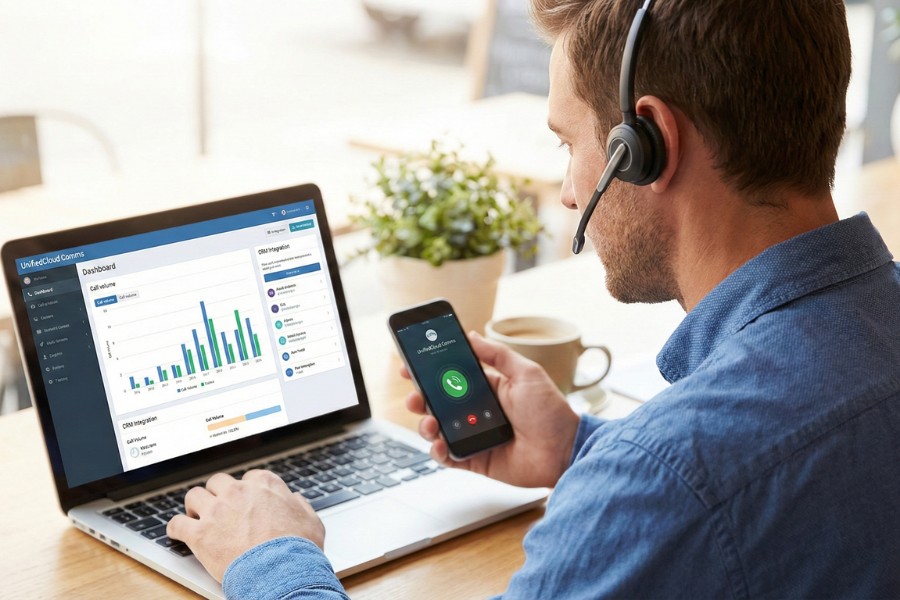
CRM Integration: It’s a big deal to be able to connect your phone system to your Customer Relationship Management (CRM) software. When a customer calls, their profile and history of interactions should automatically appear on the agent’s screen.
-
An auto-attendant (IVR), also called a virtual receptionist, helps direct calls to the right department without any help from a person. This makes the company look professional and makes sure that calls are answered quickly.
-
Voicemail-to-Email: This feature sends your voicemails to your inbox as text messages, so you can read and sort them while you’re in a meeting or on the go.
-
Advanced Analytics and Reporting: Managers need to know right away how many calls are coming in, how long people are waiting, and how well agents are doing. Strong analytics are a key part of the process of finding a cloud-based business phone system that works well for you.
Step 3: Make sure your network is ready.
What makes a cloud phone system work is the internet connection that supports it. When picking a cloud-based business phone system, one important thing that people often forget to do is check out the network infrastructure that supports it.
Voice data needs a stable, high-quality connection. Do a network test to see if there is latency, jitter, or packet loss before you pick a provider. You may need to get a better internet package or a dedicated leased line to make sure the sound quality is perfect. You should also look at your router’s Quality of Service (QoS) settings. These settings make voice calls more important than regular internet browsing so that calls don’t drop during busy times.
Step 4: How to safely pick a cloud-based business phone system that is safe, compliant, and dependable
It’s more important than ever to keep your data safe as more and more people use the cloud to talk to each other. Anyone who wants to know how to choose a cloud-based business phone system should carefully look at the security measures and promises of reliability made by the vendor.
Uptime Guarantees When a business is down, it loses money. Look for a provider with a strict Service Level Agreement (SLA) that promises at least 99.99% uptime. Ask about their data center redundancy: if one server goes down, will your calls automatically go to another server without any problems?
Data Encryption and Compliance No one should be able to hear or see your messages or voice. Make sure that the provider uses end-to-end encryption, such as TLS and SRTP. You might also need to make sure that the platform follows certain rules, like GDPR, HIPAA, or PCI-DSS, if you handle sensitive customer data or take payments over the phone.
Step 5: Consider how well your devices and hardware work together.
Even though the “brains” of the system are in the cloud, you still need physical endpoints. Before you can choose a cloud-based business phone system, you need to decide what kind of hardware your team will use.
-
IP Phones: These phones look like regular desk phones, but they connect directly to your network switch or internet router.
-
Softphones are computer programs that run on desktops or laptops, usually with good headsets.
-
Mobile Apps: Apps that you can get on your iOS or Android phone. They let employees take business calls while they’re on the go without having to give out their personal numbers.
Check to see if the vendor you want to work with requires you to buy their own hardware or if they allow “Bring Your Own Device” (BYOD) and open standard SIP phones. Using gear you already own that works with your new system can save you a lot of money on your first deployment.
Step 6: Prices and costs that aren’t clear
The budget is always the most important thing. When choosing a cloud-based business phone system, you need to think about more than just the initial price per user.
Most companies use a Software-as-a-Service (SaaS) subscription model, which means that they charge each user a fee every month or year. But you need to dig deeper to find out the full cost of ownership:
-
Do you have to pay extra for a premium tier to get the features you need, like video conferencing or advanced analytics?
-
Call Rates: Can you make as many calls as you want in the US with the plan? How much do calls to other countries cost? This can have a big effect on your monthly bill if your business makes a lot of calls outside of the UK.
-
Setup and Porting Fees: Will the provider charge you to switch your business numbers to their network? Is there an extra fee for help with onboarding or special training?
By listing all possible costs ahead of time, you can make a smart choice that won’t break the bank.
Step 7: Why it’s important to get help from your vendor
When choosing a cloud-based business phone system, you should think about two important things: customer service and your relationship with the vendor. You have to fix or change even the simplest systems from time to time.
When things go wrong, you need help that is quick and smart. Find out what kinds of support channels (phone, email, live chat) and hours of operation potential vendors have. Is tech support available 24 hours a day, seven days a week? If you run a business in Greater London or the UK, having support teams in the same time zone can help you fix problems much faster than if you used call centers in other countries.

The Decision
Changing your communication infrastructure is a big deal, but it will keep your business safe in the long run. Your team will be ready for success if you know how to pick the right cloud-based business phone system. This will make it easier for everyone to work together and give better customer service even after the PSTN is turned off in 2027.
Take the time to figure out what you need, look at the features, make sure the network is ready, and expect the vendor you choose to provide a lot of security and support.
If you’re still not sure how to choose a cloud-based business phone system or want to see how your current setup works, get in touch with our team. At Connect In Cloud Ltd, we know how to make telecommunications plans that are strong and flexible and will help your business grow.